✅ Pros
- ~$0.004/page — lowest ink cost of any all-in-one
- 2 years of ink included in the box
- 30-sheet ADF for multi-page scanning
- Auto duplex printing standard
- Ethernet + Wi-Fi + USB connectivity
- No subscription required — ever
- Excellent document and photo quality
❌ Cons
- High upfront cost (~$279)
- 15ppm black — slower than laser printers
- External tank design makes it bulkier
- Can clog if left idle 2+ months
- LCD is not a touchscreen
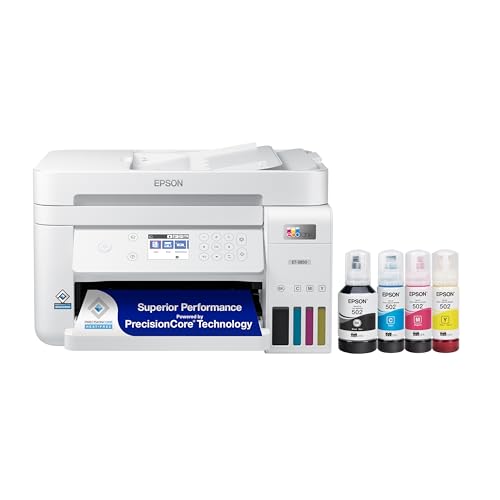
The Epson EcoTank ET-3850 is the anti-subscription printer. While HP locks you into $10–25/month Instant Ink plans, Epson includes enough ink in the box to print approximately 14,000 black pages and 5,200 color pages — roughly two years of heavy household printing. When that runs out, a full refill set costs about $45 and yields thousands more pages. We calculated the math: at 300 pages/month, the ET-3850 saves you $40–60 per month compared to cartridge-based inkjet alternatives. The $279 upfront cost pays for itself in under a year.
Who Should Buy the Epson EcoTank ET-3850?
👨👩👧👦 Families With School-Age Kids
Homework, permission slips, projects, and the occasional craft page add up fast. The ET-3850's 2-year ink supply means you'll almost never need to think about ink until 2028. When you do refill, it's $45 for another couple thousand pages — not $38 for a cartridge set that lasts 3 weeks.
🏠 Home Office / Remote Workers
Print color reports, scan documents to PDF via the ADF, copy contracts — the ET-3850 handles all of it. Ethernet connectivity means it integrates into a home network alongside wired devices. The per-page cost is dramatically lower than any alternative that also offers color.
💰 Anyone Who's Angry About Ink Prices
If you've ever paid $38 for HP 67XL cartridges that only print 480 pages, the EcoTank is your answer. No cartridges, no subscriptions, no per-month fees. Just ink you own, in tanks you refill with bottles that cost less than a movie ticket.
The ET-3850 is NOT for you if: you print fewer than 50 pages per month (the upfront cost won't recoup), need laser-level speed, or want the smallest possible printer. Light users should consider the HP ENVY 6055e with Instant Ink; speed-focused users should look at a laser printer.
Technical Specifications
| Print speed | 15ppm black / 8ppm color (ISO rated) |
|---|---|
| Resolution | 4800 × 1200 dpi (print) / 1200 dpi (scan) |
| Functions | Print, Scan, Copy |
| Duplex | Automatic two-sided printing |
| ADF | 30-sheet Automatic Document Feeder |
| Connectivity | Wi-Fi 802.11b/g/n, Ethernet 10/100, USB, Wi-Fi Direct |
| Mobile printing | AirPrint, Google Cloud Print, Epson Smart Panel app, Mopria |
| Ink system | Refillable tanks — Epson 522 series (Black, Cyan, Magenta, Yellow) |
| Included ink — Black | ~14,000 pages (2 bottles) |
| Included ink — Color | ~5,200 pages combined CMY |
| Paper capacity | 250-sheet front cassette + rear specialty feed |
| Monthly duty cycle | Up to 14,000 pages |
| Display | 2.4-inch color LCD (not touchscreen) |
| Dimensions | 14.8 × 13.7 × 9.4 in |
| Weight | 16.1 lbs |
Epson EcoTank 522 Ink Cost Breakdown — The Full Math
This is the section that matters most for the ET-3850. Let's break it down completely.
What's Included in the Box
The ET-3850 ships with enough 522 ink to print approximately:
Black (2 bottles)
Included
~14,000 pages
Cyan (1 bottle)
Included
~7,500 pages
Magenta (1 bottle)
Included
~6,000 pages
Yellow (1 bottle)
Included
~7,500 pages
Replacement Ink Bottle Prices (Epson 522)
| Ink Bottle | Amazon Price | Page Yield | Cost Per Page |
|---|---|---|---|
| 522 Black (T522120) | ~$9 | 7,500 pages | $0.0012/page |
| 522 Cyan (T522220) | ~$13 | 6,000 pages | $0.0022/page |
| 522 Magenta (T522320) | ~$13 | 6,000 pages | $0.0022/page |
| 522 Yellow (T522420) | ~$13 | 6,000 pages | $0.0022/page |
| Full set (all 4 bottles) | ~$48 | ~25,500 combined | ~$0.004/page mixed |
ET-3850 vs Cartridge Inkjet: Annual Savings
| Printer | Ink Cost/Page | Monthly (300 pages) | Annual Cost |
|---|---|---|---|
| Epson ET-3850 (EcoTank) | ~$0.004 | ~$1.20 | ~$14.40 |
| HP OfficeJet Pro 9015e (XL cartridges) | ~$0.03 | ~$9.00 | ~$108 |
| HP DeskJet 2755e (HP 67XL) | ~$0.08 | ~$24 | ~$288 |
| HP Instant Ink (Pages plan) | varies | ~$10–25/month flat | ~$120–300 |
Over 3 years, the ET-3850's ink advantage saves you $280–820 compared to cartridge-based inkjets — more than paying for the $279 printer price difference. For high-volume users, this math becomes even more compelling.
Print Quality
The ET-3850 uses Epson's PrecisionCore MicroTFP printhead with CMYK dye ink. Document output is excellent: crisp, dark black text at any font size, and vibrant color charts, graphs, and headers. Photos on Epson's premium matte paper look very good — not professional photo lab quality, but impressive for an all-in-one inkjet at this price.
Color accuracy is true and consistent. Reds stay red (not orange), skin tones look natural, and gradients render smoothly. The 4800×1200 dpi maximum resolution shows in photos — detail is sharp and noise is minimal. For presentations and marketing materials printed at home, this quality level is more than adequate.
One important note: like all inkjets, the ET-3850 can experience printhead clogging if left unused for 2+ months. Epson's automated maintenance cycles (which run ink through the head periodically) help prevent this. If you're an irregular printer, run a nozzle check every month or two. The printer will alert you when head cleaning is needed.
ADF, Scanning & Copying
The 30-sheet Automatic Document Feeder is one of the ET-3850's standout features over the cheaper ET-2803. Instead of scanning one page at a time on the flatbed, you stack up to 30 pages in the ADF and let the printer handle the rest. This is transformative for digitizing multi-page documents, scanning tax paperwork, or copying multi-page reports.
Scan quality at 1200dpi optical is excellent for documents — text scans are clean and OCR-friendly. Photo scans are good, not great (the ET-3850 is not a dedicated flatbed scanner). Copying is straightforward and delivers accurate reproductions of documents and photos.
The 2.4-inch color LCD panel provides status feedback and basic navigation, but it uses physical buttons rather than a touchscreen. Navigation is functional if slightly clunky compared to higher-end printers.
Epson ET-3850 vs HP OfficeJet Pro 9015e vs Brother MFC-J4335DW
| Feature | Epson ET-3850 | HP OfficeJet Pro 9015e | Brother MFC-J4335DW |
|---|---|---|---|
| Price | ~$279 | ~$180 | ~$179 |
| Ink cost/page (ongoing) | ~$0.004 | ~$0.03 (XL carts) | ~$0.008 (LC406XL) |
| Subscription required | No | Optional (HP+) | No |
| Included ink value | ~2 years ($180+ value) | Starter only (~$20 value) | INKvestment (~$40 value) |
| ADF capacity | 30 sheets | 35 sheets | 50 sheets |
| Print speed (black) | 15ppm | 22ppm | 12ppm |
| Ethernet | Yes | Yes | Yes |
| Annual ink cost (300 pgs/month) | ~$14 | ~$108 | ~$29 |
| 3-year total cost (printer + ink) | ~$321 | ~$504 | ~$266 |
vs HP OfficeJet Pro 9015e: HP wins on price and speed, but the 3-year total cost tells a different story. HP's ink costs add up fast — $324 in cartridges alone over 3 years vs $43 for EcoTank refills. The ET-3850 is the better long-term value.
vs Brother MFC-J4335DW: Brother's INKvestment Tank system is a closer match. Brother wins on ADF size (50 sheets) and 3-year total cost, but Epson's per-page cost is still lower long-term. Choose Brother if you need a larger ADF; choose Epson if you want the absolute lowest ink cost.
Our Verdict
4.6 / 5
TOP PICK FOR HIGH-VOLUME USERS
The Epson EcoTank ET-3850 is the best cartridge-free all-in-one printer you can buy in 2026. The ~$0.004 per-page cost is unmatched in its class. The included 2-year ink supply eliminates the usual sticker shock of ink costs. For anyone printing 200+ pages per month — especially with color needs — the ET-3850 pays for itself in months and keeps saving money for years.
The main trade-off is the $279 upfront cost. If you print less than 100 pages per month, the payback period stretches too long. But for regular users, this is the right choice.
Frequently Asked Questions
How long does the included ink last in the ET-3850?
Epson includes enough 522 ink to print approximately 14,000 black pages and 5,200 color pages. For a household printing 200 pages/month (mixed black and color), that's roughly 90 weeks — nearly 2 years without buying a single bottle. Heavy users printing 500 pages/month will exhaust it in about 10 months.
What does replacement ink cost for the Epson ET-3850?
Epson 522 replacement bottles: Black (~$9 for 7,500 pages), Cyan/Magenta/Yellow (~$13 each for ~6,000 pages each). A complete 4-bottle set costs about $48 and covers approximately 25,000 combined pages. For mixed black-and-color printing at 300 pages/month, you'd spend about $14–15 per year on ink.
What is the Epson ET-3850 cost per page?
For black-only printing: approximately $0.0012 per page (one 522 black bottle at $9 yields 7,500 pages). For mixed color printing: approximately $0.004 per page including all four ink colors. This is dramatically cheaper than any cartridge-based inkjet — HP 67XL costs about $0.079 per page by comparison.
Does the ET-3850 have an ADF (document feeder)?
Yes — the ET-3850 includes a 30-sheet Automatic Document Feeder. This lets you scan or copy multi-page documents without manually flipping pages on the flatbed. It's a key upgrade over the ET-2803, which lacks an ADF entirely.
Can the ET-3850 clog if I don't print often?
Yes — all inkjets can experience printhead clogging when left idle for extended periods. The ET-3850's risk is moderate: Epson runs automatic maintenance cycles, and EcoTank's continuous ink system is somewhat more resistant to drying than standard cartridges. Best practice: print at least a test page every 2–3 weeks if you're an occasional user.
How does the ET-3850 compare to the ET-2803?
The ET-2803 (~$200) is cheaper and compact but lacks the ADF and Ethernet port. The ET-3850 adds: 30-sheet ADF for multi-page scanning, Ethernet connectivity for wired networking, faster print speed (15ppm vs 10ppm), and a slightly larger paper capacity. For anyone who scans documents regularly, the $80 ET-3850 premium over the ET-2803 is absolutely worth it.
Does the ET-3850 work without a subscription?
Yes, completely. Unlike HP+ printers that require an account or HP Instant Ink subscriptions, the ET-3850 has no subscription, no cloud registration requirement, and no monthly fees of any kind. You buy ink bottles when you need them and refill the tanks yourself — that's it.
Is the Epson ET-3850 worth it for occasional printing?
Probably not. For users printing fewer than 50–75 pages per month, the $279 upfront cost takes 3+ years to recoup compared to cheaper inkjets. At very low usage, the risk of printhead clogging also increases. Light users are better served by an HP DeskJet 2755e (~$70) or with HP Instant Ink for predictable monthly costs. The ET-3850 shines at 200+ pages/month.
About this review: PrinterStores.com is reader-supported. Affiliate links on this page may earn us a commission at no extra cost to you. Our rankings are never influenced by manufacturers or advertisers. All prices were verified at time of publication — check Amazon for current pricing.
💡 Also see: 5 ways you're buying printer ink wrong — and how to fix it.