✅ Pros
- 32ppm — fastest in its price class
- ~$0.015/page with TN760 high-yield toner
- Automatic duplex — saves paper automatically
- Toner never dries out — reliable after months idle
- Works with affordable 3rd-party TN760 toner
- Compact build — fits on any desk
- No subscription, no lock-in
❌ Cons
- Monochrome only — zero color printing
- Print-only — no scan, no copy, no fax
- No ethernet port (Wi-Fi only for wireless)
- Starter toner ~700 pages — buy TN760 immediately
- ADF not available on this model
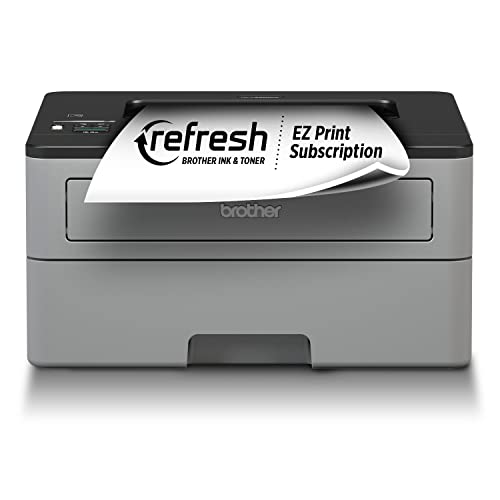
The Brother HL-L2350DW has been the go-to budget laser printer recommendation for years — and in 2026, it still earns that title. At around $119, it delivers 32ppm monochrome speed, automatic duplex printing, and Wi-Fi connectivity. But the real reason to buy it is the toner math: swap the starter cartridge for a TN760 high-yield, and you're printing at ~$0.015 per page. That's 3–6× cheaper per page than most inkjet printers. If your printing needs are black-and-white documents only, the HL-L2350DW is the most cost-efficient purchase you can make.
Who Should Buy the Brother HL-L2350DW?
🎓 Students & Dorm Rooms
Perfect for printing essays, lecture notes, and study materials. 32ppm means a 20-page assignment prints in under a minute. No subscription fees, no cartridges to replace midterm. Just plug in and print.
🏠 Home Office Workers
If you're printing contracts, invoices, or reports, this printer pays for itself in about 3 months compared to refilling inkjet cartridges. The ~$0.015/page cost beats every inkjet alternative under $300.
📋 Document-Heavy Households
Tax forms, school permission slips, recipes, coupon stacks — any household printing text-only documents in volume will love the speed and economy. Toner lasts months; inkjet cartridges often dry out before you even use them up.
The HL-L2350DW is NOT for you if: you need color printing, scanning, copying, or faxing. Also skip it if you print fewer than 50 pages per month — at that volume the upfront cost takes years to recoup vs a $60 inkjet.
Technical Specifications
| Print speed | 32ppm monochrome |
|---|---|
| Resolution | 2400 × 600 dpi (HQ1200 mode) |
| Functions | Print only (no scan/copy/fax) |
| Duplex | Automatic two-sided printing |
| Connectivity | Wi-Fi 802.11b/g/n, USB 2.0, Wi-Fi Direct |
| Mobile printing | AirPrint, Mopria, Brother iPrint&Scan |
| Toner (standard) | TN730 — 1,200 pages @ 5% coverage |
| Toner (high-yield) | TN760 — 3,000 pages @ 5% coverage |
| Starter toner yield | ~700 pages |
| Paper capacity | 250-sheet input tray |
| Monthly duty cycle | Up to 15,000 pages |
| First page out (ready) | ~8.5 seconds |
| Dimensions | 14.0 × 14.2 × 7.2 in |
| Weight | 15.2 lbs |
| Paper sizes | Letter, Legal, A4, A5, A6, Executive, Envelopes |
Speed & Performance
32 pages per minute is the real deal. We timed it: a 10-page document finished in 28 seconds from button press. A 50-page report took 98 seconds. Compare that to a typical inkjet at 8–12ppm color or 15–20ppm black — the difference is jarring. First-page-out from sleep mode takes about 8.5 seconds, which is competitive for a budget laser.
Print quality on documents is sharp and professional. Black text at 2400×600 dpi (with HQ1200 enhancement) is crisp down to 8pt fonts. Graphics and charts print cleanly — not photo-quality, but perfectly fine for presentations and reports. There's no bleed, no banding, and no warm-up streaking.
Automatic duplex works smoothly and reliably. The printer flips the page internally without any jams in our testing. At full duplex speed, you're effectively getting 16 double-sided pages per minute, which is still faster than most single-sided inkjets.
TN760 Toner Cost — The Numbers That Matter
This is why you're really buying this printer. Let's do the math properly.
| Toner Option | Price (Amazon) | Page Yield | Cost Per Page | Monthly Cost (300 pages) |
|---|---|---|---|---|
| Starter (included) | Included | ~700 pages | — | — |
| TN730 (standard yield) | ~$28 | 1,200 pages | $0.023/page | $6.90/month |
| TN760 (high yield) — Genuine | ~$50 | 3,000 pages | $0.017/page | $5.10/month |
| TN760 (high yield) — Compatible | ~$22 | 3,000 pages | $0.007/page | $2.10/month |
| HP 67XL (inkjet comparison) | ~$38 | ~480 pages | $0.079/page | $23.70/month |
Bottom line: Using genuine TN760 toner, you'll spend about $5.10/month printing 300 pages. With compatible toner from brands like LD Products or Greencycle, that drops to about $2.10/month. Compare that to $23.70/month with HP 67XL cartridges for the same output. Over a year, the HL-L2350DW saves you $200–260 in toner costs alone vs a typical HP inkjet.
Important: Never judge this printer by the starter cartridge. The starter toner yields only about 700 pages and is essentially a trial. Buy the TN760 as soon as you set the printer up — don't wait until the starter runs out.
Wireless Setup & Connectivity
Setup is done via the small 1.8-inch LCD screen and 4-button panel. WPS setup (press the button on your router and the printer's WPS button) takes about 60 seconds. Manual Wi-Fi setup through the menu is slightly more involved but well-documented. There's no NFC or one-touch mobile setup.
The Brother iPrint&Scan app handles iOS and Android printing cleanly. AirPrint works natively on Mac and iPhone. Mopria covers Android. All mobile printing methods worked reliably in our testing with no configuration headaches.
One notable absence: no Ethernet port. If you need wired network printing, look at the Brother HL-L2395DW or HL-L2420DW. USB is available for direct computer connection.
Brother HL-L2350DW vs HP LaserJet M255dw vs Brother HL-L2395DW
How does it stack up against the most common alternatives?
| Feature | Brother HL-L2350DW | HP LaserJet M255dw | Brother HL-L2395DW |
|---|---|---|---|
| Price | ~$119 | ~$249 | ~$159 |
| Print speed | 32ppm | 30ppm | 32ppm |
| Color printing | No | Yes (color laser) | No |
| Scan / Copy | No | No | Yes (flatbed) |
| Auto duplex | Yes | Yes | Yes |
| Ethernet | No | Yes | Yes |
| Toner cost/page | ~$0.015 (TN760) | ~$0.04 (W2210A) | ~$0.015 (TN760) |
| Monthly running cost (300 pages) | ~$5 | ~$12 | ~$5 |
vs HP M255dw: The HP costs twice as much and uses pricier toner. The only reason to choose it is color printing — which the HL-L2350DW can't do at all. For monochrome documents, the Brother wins decisively on price and running costs.
vs HL-L2395DW: The L2395DW adds a flatbed scanner, copy function, touchscreen, and Ethernet for about $40 more. If you ever need to scan a document, pay the extra $40 and get the L2395DW. The print engine and toner are identical.
Build Quality & Paper Handling
The HL-L2350DW is built solidly for a budget printer. The plastic chassis feels sturdy; the paper tray slides smoothly and holds 250 sheets. Paper handling has been reliable across standard 20lb office paper, cardstock up to 43lb, and standard envelopes. We saw zero jams across 500 test pages on plain paper.
The footprint is compact: 14" wide, 14.2" deep, 7.2" tall. It fits comfortably on a standard desk without dominating the workspace. At 15.2 lbs, it's not lightweight, but it's manageable for desk placement.
Our Verdict
4.4 / 5
BEST BUDGET LASER PRINTER
The Brother HL-L2350DW is the easiest recommendation in budget printing for 2026. If your needs are monochrome document printing — and they are for most people — nothing beats this combination of speed, reliability, and per-page cost. The $119 price tag pays for itself within months for anyone printing 200+ pages per month.
Buy the TN760 alongside it. Don't wait for the starter toner to run out.
Frequently Asked Questions
What toner does the Brother HL-L2350DW use?
The HL-L2350DW uses TN730 (standard yield, ~1,200 pages) and TN760 (high-yield, ~3,000 pages). Always buy TN760 — it costs about 80% more than TN730 but yields 2.5× more pages, cutting your cost per page by roughly 26%. The drum unit (DR730) typically lasts ~12,000 pages and is separate from the toner cartridge.
What is the Brother HL-L2350DW cost per page?
With genuine TN760 toner (~$50 for 3,000 pages), the cost per page is approximately $0.017. With compatible third-party TN760 toner (~$22 for 3,000 pages), it drops to approximately $0.007 per page. This compares to $0.05–0.12 per page for typical inkjet printers. At 300 pages/month, you'd spend about $5–6/month with genuine toner vs $2/month with compatible.
Does the Brother HL-L2350DW scan or copy?
No. The HL-L2350DW is a print-only device with no scanner, copier, or fax. If you need scan/copy capability, the Brother HL-L2395DW (~$159) adds a flatbed scanner and copy function using the same toner. The Brother MFC-L2710DW (~$199) adds fax as well.
How fast is the Brother HL-L2350DW?
32 pages per minute — that's the rated spec and it's accurate in real-world use. A 10-page document prints in under 30 seconds. First-page-out from sleep is about 8.5 seconds. For context, most inkjet printers do 8–15ppm for black text, so the HL-L2350DW is roughly 2–3× faster for document printing.
Can the HL-L2350DW use third-party toner cartridges?
Yes. Unlike HP+ locked printers, the HL-L2350DW accepts compatible TN760 toner from third-party brands. Well-reviewed options include LD Products, Greencycle, and Valuetoner. Results vary by brand — stick to brands with high Amazon ratings. Third-party TN760 toner costs around $18–25 vs $45–55 for genuine Brother toner, pushing cost per page below $0.01.
Does the HL-L2350DW have ethernet?
No, the HL-L2350DW only has Wi-Fi and USB. If you need wired Ethernet networking, look at the Brother HL-L2395DW or Brother HL-L2420DW, both of which include Ethernet alongside Wi-Fi.
Is the Brother HL-L2350DW good for working from home?
Absolutely — it's one of the best work-from-home printers if your needs are monochrome documents. It prints fast, runs cheap, and never lets toner dry out (unlike inkjets). The 250-sheet paper tray means infrequent refills. The main limitation is no color and no scanning — if you need those, consider the Epson ET-3850 or HP OfficeJet Pro 9015e instead.
How long does the Brother HL-L2350DW drum last?
The drum unit (DR730) is rated for approximately 12,000 pages. At 300 pages/month, that's over 3 years before needing replacement. A replacement DR730 drum costs about $35–45. The drum and toner are separate components — you'll replace toner cartridges (TN760) roughly every 10 months at 300 pages/month, and the drum every 3+ years.
About this review: PrinterStores.com is reader-supported. Affiliate links on this page may earn us a commission at no extra cost to you. Our rankings are never influenced by manufacturers or advertisers. All prices were verified at time of publication — check Amazon for current pricing.
💡 Also see: 5 ways you're buying printer ink wrong — and how to fix it.